Dependency Radar

See cross-squad delivery risk before it derails the work.

Dependency Radar is a Jira Cloud app that turns existing Jira issue links into clear sprint and matrix views for scrum-of-scrums, delivery leads, and Jira teams working across multiple squads.
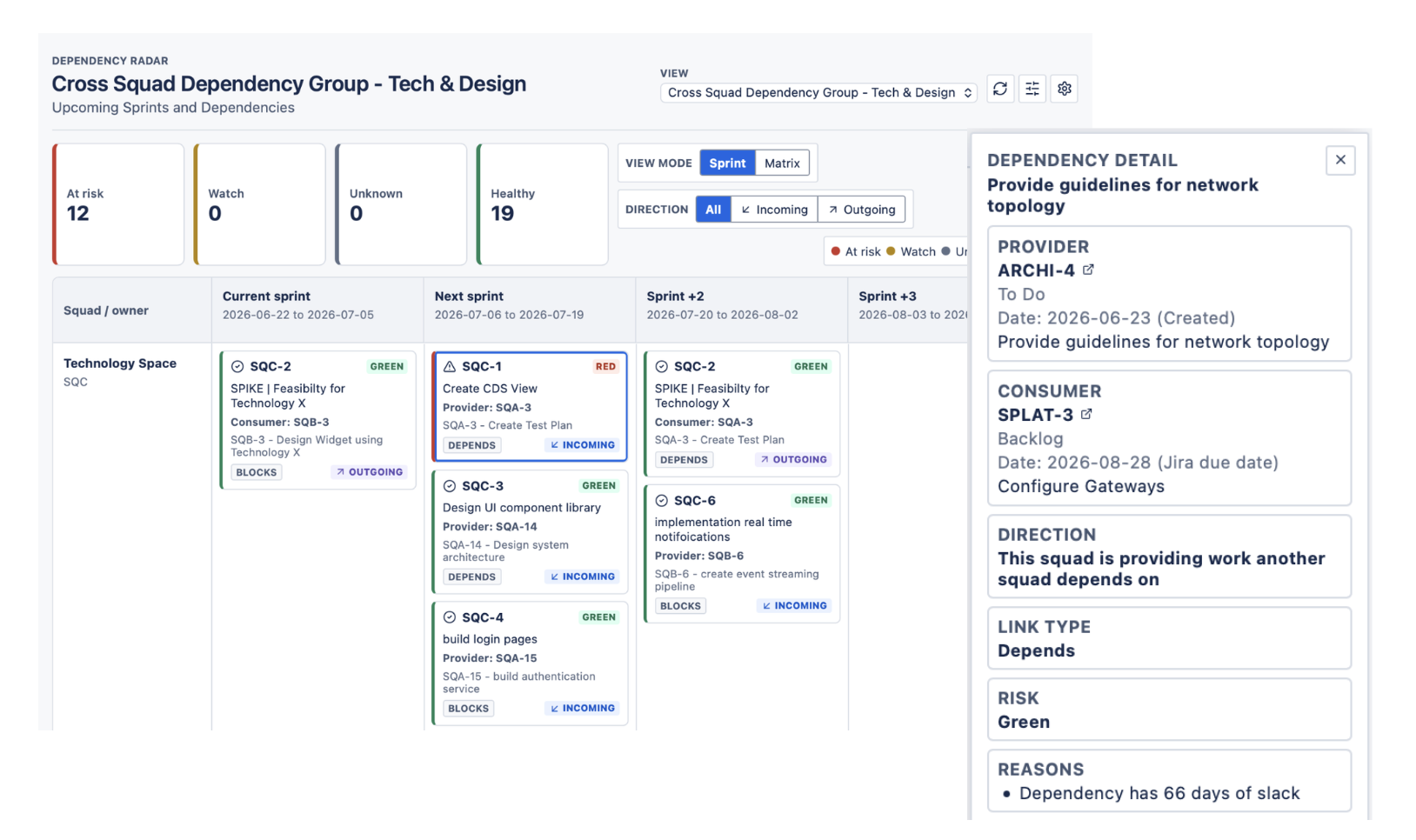
Dependency Radar for Jira — squad-by-sprint view with risk flags and dependency details

How it works

From the Jira links your teams already maintain to a clear cross-squad picture.

1
Connect your Jira links

Dependency Radar reads the issue links your teams already maintain in Jira Cloud — no new fields or workflows to learn.

2
View sprint and matrix layouts

Switch between squad-by-sprint and matrix views to see who is providing work, who is consuming it, and where the hand-offs sit.

3
Focus on red and amber issues

Blocked, delayed, and carried-over dependencies surface automatically so you can act before they derail delivery.

With a few clicks you can customize sprint dates, threshold limits and the date fields used (due / start) and be ready to surface data for a meaningful conversation straight out of the gate.

The app then identifies provider and consumer relationships between squads and places those dependencies into tailorable sprint-based views.

Teams can use Dependency Radar to:

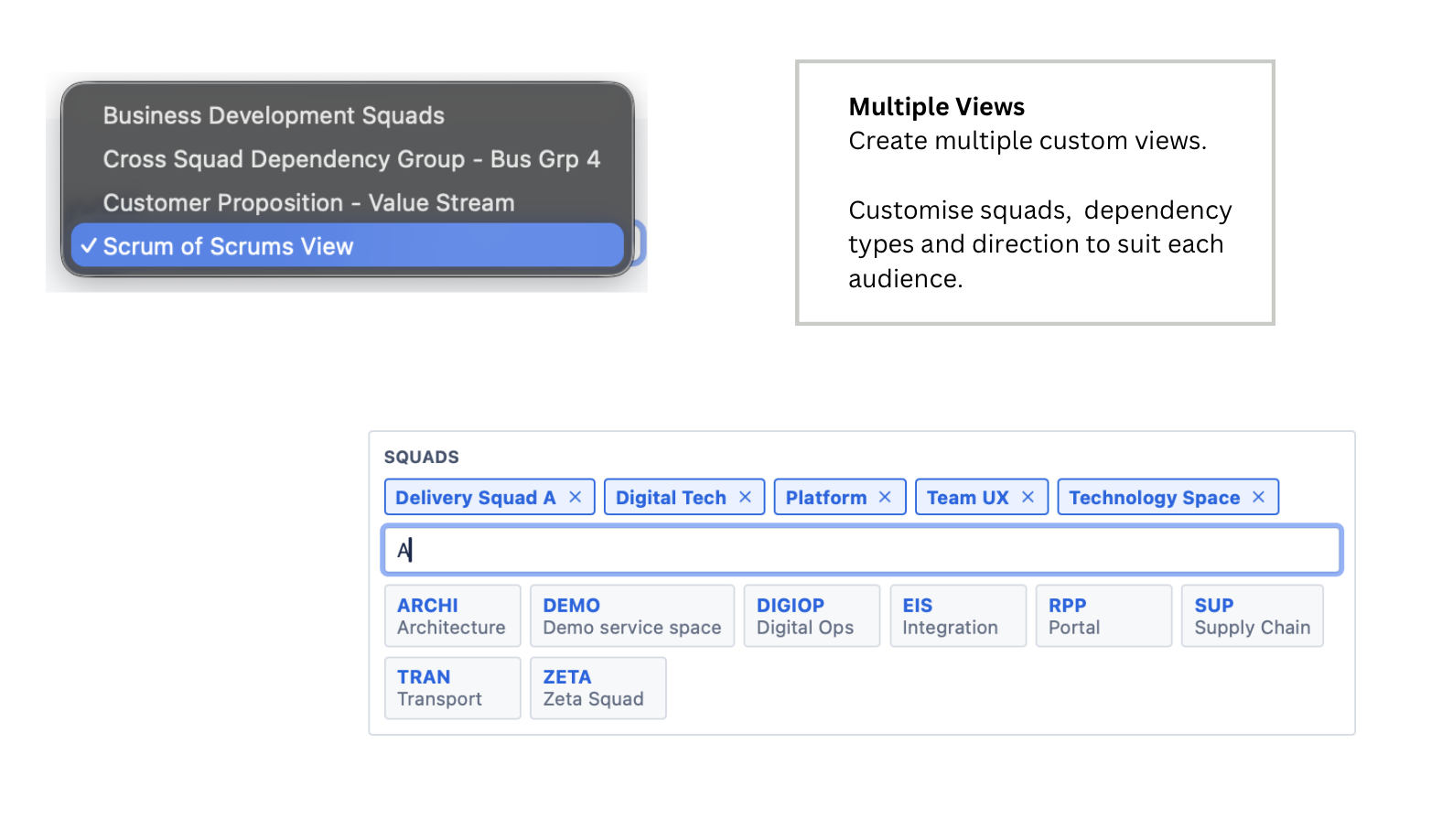
  • Create saved views for a squad group or ART-sized delivery group
  • Scan dependencies across a scrollable sprint timeline
  • Filter by risk status, dependency type, project, or direction
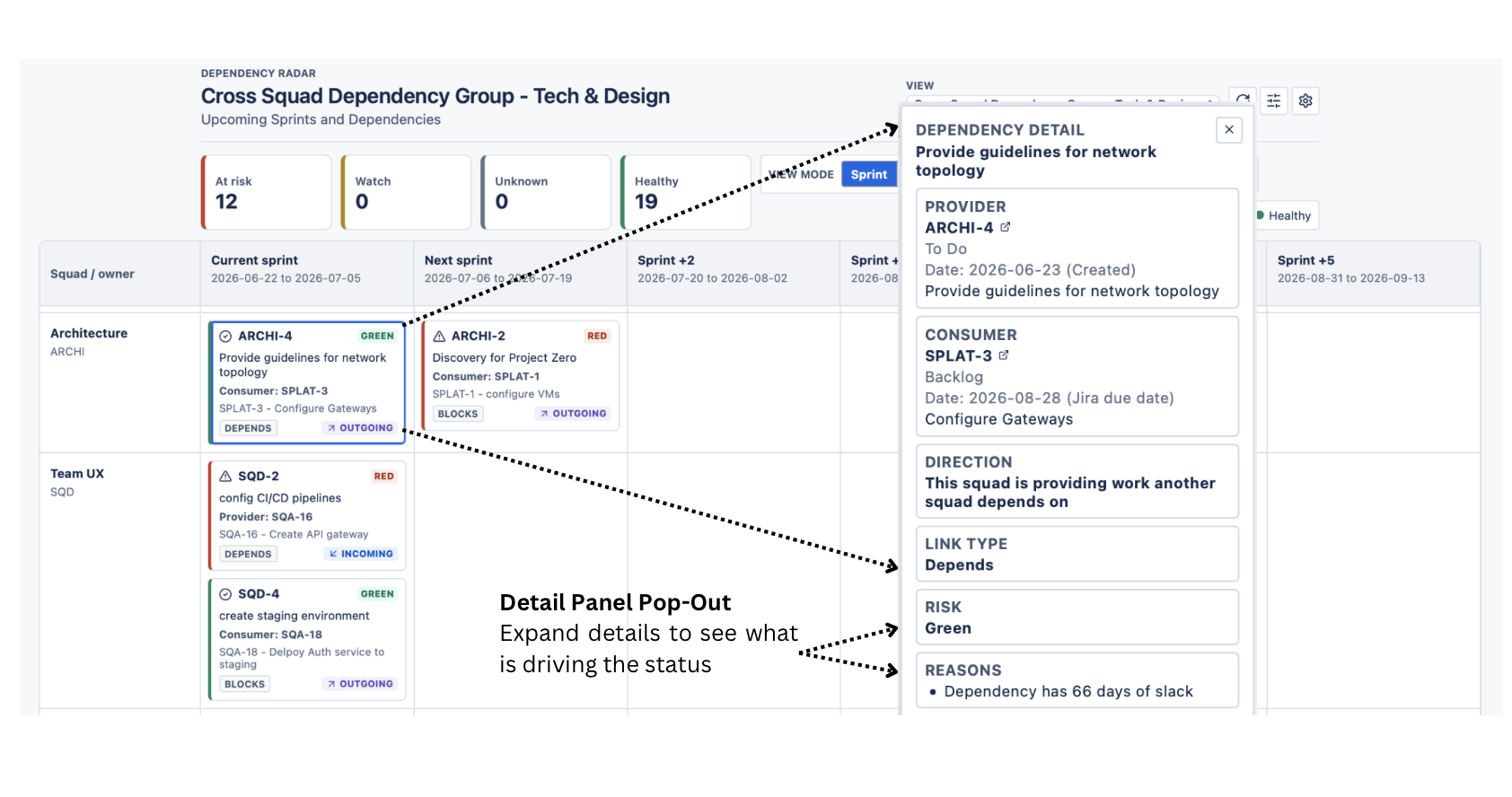
  • Open dependency details to inspect the consumer issue, provider issue, status, dates, and risk reason
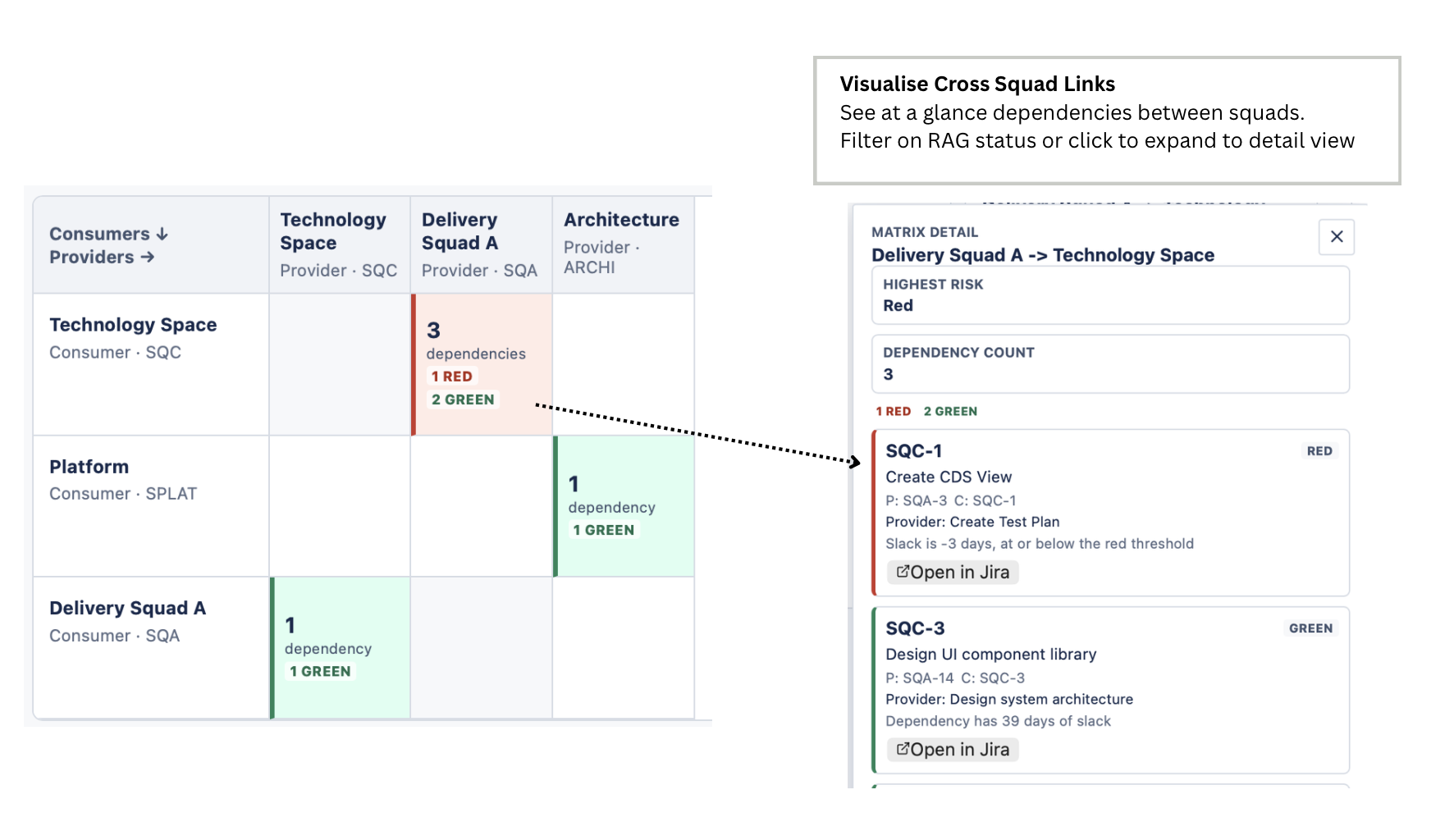
  • Use matrix views to compare provider and consumer cross-squad links at a glance

Risk indicators help facilitators focus the conversation. Red and amber items show where dependencies may already be blocked, overdue, carried forward, or at risk of causing flow-on delivery impact.

The product works from existing Jira data. Teams continue creating and maintaining issues and links in Jira as normal; Dependency Radar provides the visibility layer.

Screenshots

A closer look at Dependency Radar for Jira.
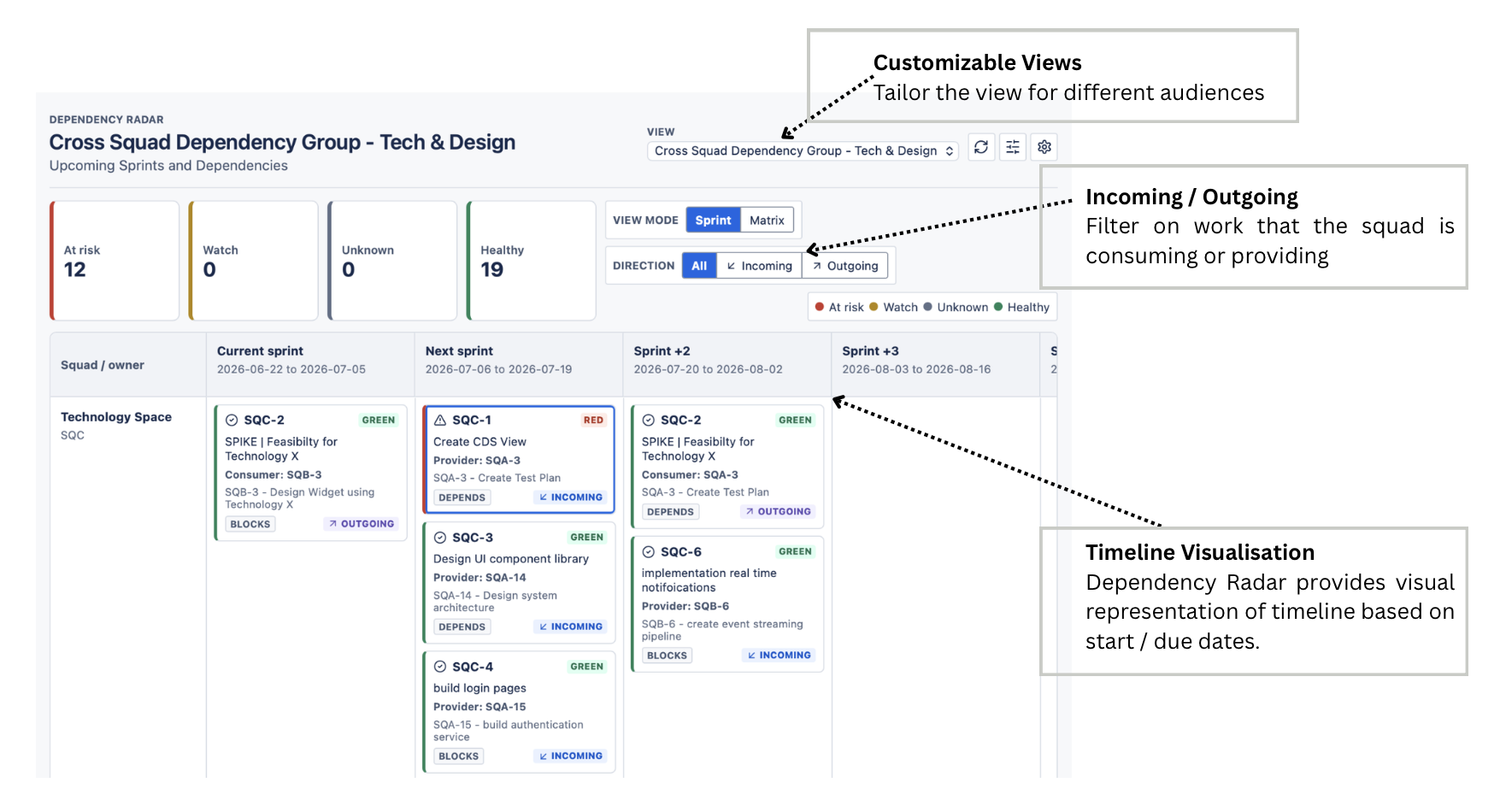
Squad-by-sprint view

Timeline visualisation — squad-by-sprint view with customizable views and incoming/outgoing filters.

Dependency matrix view

Matrix view — visualise cross-squad links at a glance, filter on RAG status, and expand for detail.

Red and amber risk flags

Detail panel pop-out — expand any dependency to see what is driving its status.

Underlying Jira ticket inspect

Multiple views — customise squads, dependency types, and direction to suit each audience.

Security and privacy

Built to use the minimum data needed to visualise cross-squad dependency risk.

Dependency Radar is a Jira Cloud Forge app designed to use the minimum data needed to visualise cross-squad dependency risk.

The app reads Jira issue and project data available through the installed app permissions and the current user’s Jira access. This may include issue keys, summaries, statuses, issue types, relevant dates, project names, issue-link types, and linked issue references. This data is used to identify provider and consumer relationships, build sprint and matrix dependency views, calculate risk indicators, and show dependency details to authorised Jira users.

Dependency Radar stores app-owned configuration in Atlassian Forge storage. This includes saved views, selected project sets, dependency link mappings, sprint calendar settings, matrix settings, done and blocked status mappings, and display preferences required for the app to function.

Dependency Radar is designed as a read-only Jira visibility layer. It does not write dependency metadata back to Jira issues, does not create separate dependency records, and does not require Jira issue write permissions.

Dependency Radar does not request, collect, process, or store Atlassian passwords, API tokens, payment card data, or private credentials. Data use is limited to Jira issue, project, link, status, date, and app configuration data needed to provide dependency visualisation, saved views, and risk indicators.

The current architecture is Forge-first and does not use an app-owner-hosted backend for customer Jira data. App code and app-owned configuration are hosted through Atlassian Forge. Customer Jira data is processed within Atlassian Forge and is not sent to external third-party services by Dependency Radar. If future versions add analytics, monitoring, AI services, Forge Remote, or other external processors, those data flows will be documented before release.

Ready to see cross-squad risk clearly?

Check the instructions, review the privacy policy and license, and get started in minutes.